Syntax: How to Assign a Series to an Axis
series:
[
    {
      series: snumber,
      yaxisAssignment: ynumber,
   }
]
where:
- snumber
Is a zero-based series number. If the series does not exist in the chart, the property is ignored.
- ynumber
Assigns the specified series to the y- or y2-axis. Valid values are:
- 1, which assigns the series to the y-axis. This is the default value.
- 2, which assigns the series to the y2-axis.
Example: Assigning a Series to an Axis
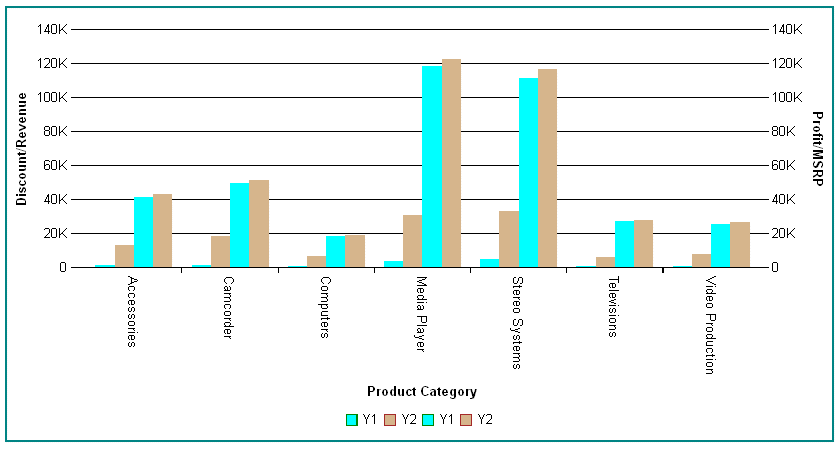
The following request generates a vertical bar chart with a y- and y2-axis and assigns series to each axis:
GRAPH FILE WF_RETAIL_LITE
SUM DISCOUNT_US GROSS_PROFIT_US REVENUE_US MSRP_US
BY PRODUCT_CATEGORY
ON GRAPH PCHOLD FORMAT JSCHART
ON GRAPH SET LOOKGRAPH VBAR
ON GRAPH SET STYLE *
*GRAPH_JS
border:{width:2, color:'teal'},
title: {text: 'yAxisAssignment',font: '14pt Sans-Serif', color: 'teal'},
yaxis:{title: {visible: true, text: 'Discount/Revenue'}},
y2axis:{title: {visible: true, text: 'Profit/MSRP'}},
series:[
{series: 0, color: 'cyan', yAxisAssignment: 1,  label: 'Y1', marker:
{border: {width: 1, color: 'green'}}},
{series: 1, color: 'tan', yAxisAssignment: 2,  label: 'Y2', marker:
{border: {width: 1, color: 'brown'}}},
{series: 2, color: 'cyan', yAxisAssignment: 1,  label: 'Y1', marker:
{border: {width: 1, color: 'green'}}},
{series: 3, color: 'tan', yAxisAssignment: 2,  label: 'Y2', marker:
{border: {width: 1, color: 'brown'}}},
]
*END
ENDSTYLE
END
The output is: