Syntax: How to Link to a WebFOCUS Maintain Procedure
TYPE=type, [subtype, ] URL=/ibi_apps/WFServlet? IBIF_cmd='MNTCON
  {RUN|EX} procname' IBIS_passthru='on' IBIS_connect='on'
  [(parameters...)], $
where:
- type
- Identifies the report component that you select in the web browser to execute the link. The TYPE attribute and its value must appear at the beginning of the declaration.
- subtype
- Are any additional attributes, such as COLUMN, LINE, or ITEM, that are needed to identify the report component that you are formatting. See Identifying a Report Component in a WebFOCUS StyleSheet for information on identifying report components.
- procname
- Is the name of the WebFOCUS Maintain procedure.
- parameters
- Values that are passed to the WebFOCUS Maintain procedure. For details, see Creating Parameters.
Example: Linking to a WebFOCUS Maintain Procedure
The following report allows you to update the unit price for a product directly from the report output by linking the report to the appropriate Maintain procedure.
The report request is:
TABLE FILE GGPRODS
PRINT PRODUCT_DESCRIPTION VENDOR_CODE VENDOR_NAME UNIT_PRICE
BY PRODUCT_ID
ON TABLE SET PAGE-NUM OFF
ON TABLE SET STYLE *
TYPE=REPORT, GRID=OFF, $
TYPE=DATA, COLUMN=N1,
    URL=/ibi_apps/WFServlet?(PRODUCT_ID=N1 IBIF_cmd='MNTCON RUN GGUPD1'
IBIS_passthru=\
     'on' IBIS_connect='on'), $
ENDSTYLE
END
The WebFOCUS Maintain procedure (ggupd1) is:
MAINTAIN FILE ggprods
module import(mntuws FOCCOMP)
$$Declarations
Declare pcode/a4;
Case Top
compute timechk/a0=HHMMSS();
document.referer='/ibi_apps/WFServlet?IBIF_ex=ggprod&IBIS_connect
=on'||
'&timechk='|timechk;
compute pcode = IWC.getAppCGIValue("PRODUCT_ID");
Infer ggprods.prods01.product_id into ggstk1;
Reposition PRODUCT_ID
Stack clear ggstk1 ;
For all next ggprods.prods01.product_id into ggstk1
 where product_id eq pcode;
Winform Show Form1;
EndCase
Case Updte1
for all Update ggprods.prods01.unit_price from ggstk1(1) ;
EndCase
END
Note: This is an interactive form to display data and is created in Developer Studio.
The report is:
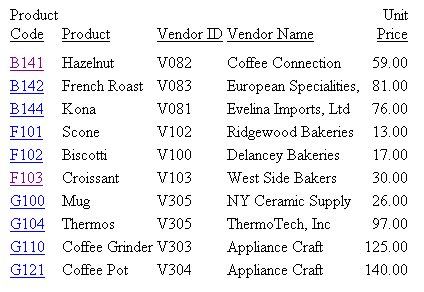
When you click a Product Code, the Maintain procedure ggupd1 is invoked, which uses the IWC.getAppCGIValue function to retrieve the correct value.
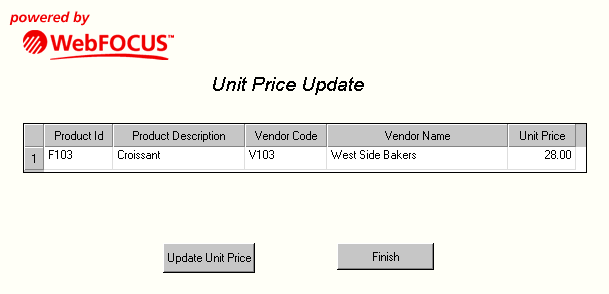
Form 1 in the WebFOCUS Maintain procedure ggupd1 opens and you can update the unit price for that product: