axisAutoLayout: {
   rotate45: booleanr45,
   rotate90: booleanr90,
   truncate: booleantrunc,
   stagger: booleanstag,
   skip: booleanskip},
where:
- booleanr45
Can be:
true, which allows auto-layout to rotate labels 45 degrees in order to achieve the best automatic layout of ordinal axis labels. The default value is true.
false, which does not allow auto-layout to rotate labels 45 degrees.
- booleanr90
Can be:
true, to allow auto-layout to rotate labels 90 degrees in order to achieve the best automatic layout of ordinal axis labels. The default value is true.
false, which does not allow auto-layout to rotate labels 90 degrees.
- booleantrunc
Can be:
true, which allows auto-layout to truncate labels in order to achieve the best automatic layout of ordinal axis labels. The default value is true.
false, which does not allow auto-layout to truncate labels.
- booleanstag
Can be:
true, which allows auto-layout to stagger labels in order to achieve the best automatic layout of ordinal axis labels. The default value is true.
false, which does not allow auto-layout to stagger labels.
- booleanskip
Can be:
- true, which allows auto-layout to skip labels in order to achieve the best automatic layout of ordinal axis labels. The default value is true.
- false, which does not allow auto-layout to skip labels.
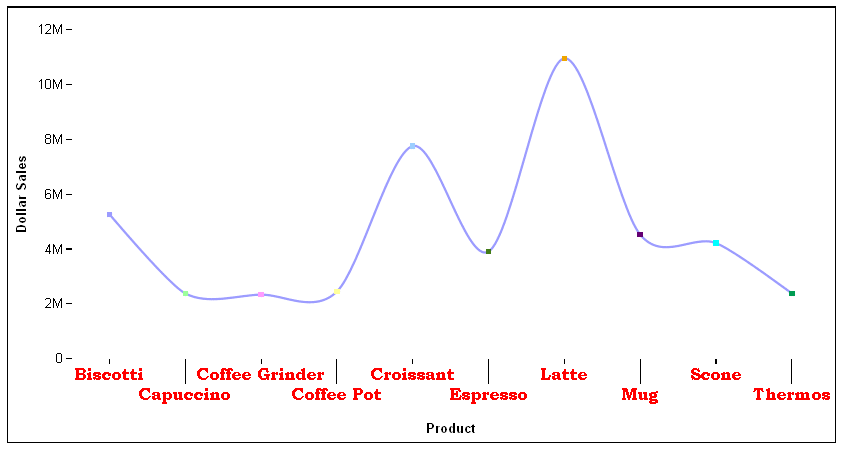
The following request against the GGSALES data source generates a vertical line chart. The axisAutoLayout properties do not allow rotation, truncation, or skipping of group labels, but they are allowed to be staggered:
GRAPH FILE GGSALES
SUM DOLLARS
BY PRODUCT
ON GRAPH PCHOLD FORMAT JSCHART
ON GRAPH SET LOOKGRAPH VLINE
ON GRAPH SET STYLE *
*GRAPH_JS
blaProperties: {lineConnection: 'curved'},
xaxisOrdinal: {labels: {visible: true,font: 'bold 12pt Bookman Old Style',color: 'red',rotation: 0}},
  axisAutoLayout:{rotate45:false, rotate90:false,truncate:false, stagger:true, skip:false}
*END
ENDSTYLE
END
On the output, the labels are staggered:
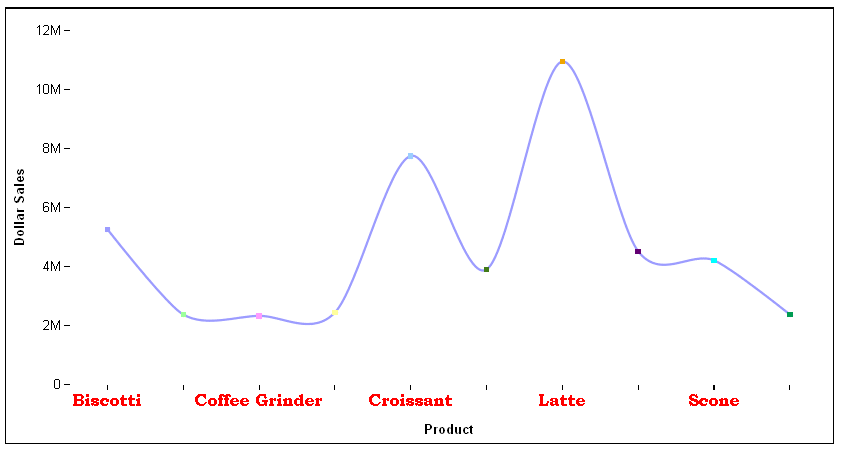
Changing the axisAutoLayout properties to the following makes skipping allowed, but not staggering:
axisAutoLayout:{rotate45:false, rotate90:false,truncate:false, stagger:false, skip:true}With these properties, the output is: